The Brain in the Basement: Running Jarvis's AI Entirely On My Own Hardware
The whole point of Jarvis is that its intelligence lives under my roof, not in someone else's cloud. Here's how a two-tier local language-model setup keeps everyday chat snappy and the hard reasoning sharp — plus the day I almost 'fixed' a system that was working perfectly.
 Colby Wright · Director of Engineering, AI Engineering & Automation
·4 min read·Updated

This is a deep-dive in my Jarvis build series — a locally-run AI command center for the home lab. Start with the flagship overview for the full picture.
If there’s one decision that defines the entire Jarvis project, it’s this: the language models run locally. No cloud API. No request leaving the house. When I talk to Jarvis, the words go from my mouth, to a microphone in the room, to a machine I own, and back out a speaker — and at no point does any of it touch the open internet.
That’s not a small thing to pull off at home, and it shapes everything. This is how the brain works.
Why Local at All?
The easy path would have been to wire Jarvis up to a cloud AI service. It would’ve been cheaper to start, simpler to maintain, and instantly more capable. So why not?
Privacy. A home assistant hears everything. Conversations, routines, who’s home, what time I go to bed. The only bulletproof privacy guarantee is “the data never leaves.”
Independence. Cloud services change their terms, deprecate models, raise prices, and go down. A house that stops responding because a vendor had an outage isn’t a smart house — it’s a fragile one. Local means it works because I made it work, full stop.
The challenge. Honestly? Running capable AI on hardware in my own home is just a more interesting problem. That’s a perfectly good reason to build something.
The Two-Tier Architecture
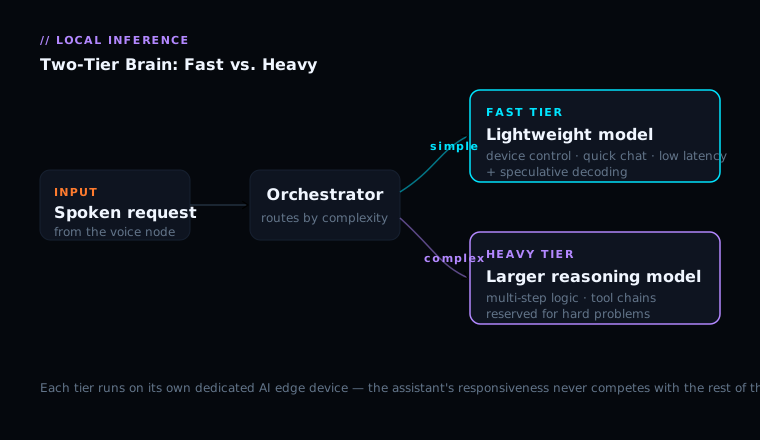
Here’s the core insight that makes a local setup actually pleasant to use: not every request needs the same amount of brain.
“What time is it?” needs almost nothing. “Reason through the tradeoffs of this multi-step plan and call the right tools in order” needs a lot. If you route everything through one big, slow, smart model, the simple stuff feels sluggish. If you route everything through one small, fast model, the hard stuff falls apart.
So Jarvis runs two models. The fast tier handles the bulk of conversational turns — quick, lightweight, tuned for low latency. The heavy tier is a larger, smarter model reserved for genuine reasoning: multi-step problems, complex tool-use chains, anything that benefits from more horsepower. Each tier runs on its own dedicated AI edge device, so the voice assistant’s responsiveness never competes with whatever else the lab is doing.
The Speed Trick: Speculative Decoding
The fast tier has a clever optimization called speculative decoding. Language models generate text one token at a time, and each token requires a full pass through the model — that’s the bottleneck. Speculative decoding adds a tiny “draft” model that guesses the next several tokens almost for free. The big model then checks all those guesses in a single pass, accepting a whole run at once when the draft guessed right. For predictable text, that’s often — so you get a meaningful speedup for free.
The Day I Almost Broke Something That Worked
This is the part of the story I keep coming back to, because the lesson is bigger than the project.
One day, Jarvis felt slow. And I had a theory ready immediately: the speculative decoding must have gone erratic. It was a tidy, plausible explanation. I was ready to start “fixing” it.
Then I did the thing I’ve trained myself to do: I measured it on the actual machine before touching anything. The numbers told a completely different story. The fast model had been running, untouched, for days. The acceptance rate on the speculative decoding was good. There was no regression. What I’d interpreted as “slow” was a cold-start artifact plus my own confirmation bias reading a single unlucky sample as a trend.
I had been about thirty seconds from disabling a perfectly healthy optimization based on a story I told myself.
The lesson — and it’s one I now treat as a law: verify before you diagnose. A plausible theory is not evidence. The real machine has the real answer, and it costs almost nothing to go look. The most expensive mistakes in systems work aren’t the bugs you fail to find — they’re the “fixes” you apply to things that were never broken.
Tool Use: Where the Intelligence Actually Lives
A model that can only chat is a novelty. What makes Jarvis useful is that the brain can call tools — and chain them. When I ask something that requires action, the orchestrator hands the model a set of available tools and lets it decide what to call. The model picks a tool, sees the result, and can call another based on what it learned — looping until it has what it needs. This is the difference between “an AI that talks about your house” and “an AI that runs your house.”
What Running It Locally Actually Costs (And Doesn’t)
It costs hardware. Dedicated compute that draws power around the clock. It costs tuning. You own the whole stack; when something’s off, you’re the support line. It does NOT cost capability — as much as you’d think. For the things a home assistant actually does — conversation, device control, reasonable reasoning, tool use — a good local setup is more than enough. And it buys something you can’t buy back: total privacy and total independence.
The Takeaway
A two-tier architecture — fast model for the everyday, heavy model for the hard stuff — turns out to be the right shape for a home assistant. It keeps the experience snappy where snappiness matters and sharp where sharpness matters, all without a single byte leaving the house. Intelligence that’s genuinely mine, running on hardware I can walk over and put my hand on.
— Colby, NerdlyBuilds