If a Drive Dies Tonight: Building Disaster Recovery for a Sprawling Home Lab
A home assistant that controls your house is only as good as your ability to rebuild it. Here's how I turned a pile of running-but-undocumented services into a version-controlled, triple-redundant, secret-free recovery system — and what the inventory turned up that genuinely surprised me.
 Colby Wright · Director of Engineering, AI Engineering & Automation
·5 min read·Updated
This is a deep-dive in my Jarvis build series — a locally-run AI command center for the home lab. Start with the flagship overview for the full picture.
Here’s an uncomfortable question every home-lab builder should ask themselves: if your main server’s drive died tonight, how long would it take to rebuild everything — and could you even do it?
For a long time, my honest answer for the Jarvis project was: weeks, and maybe not. The whole system existed primarily as running processes on machines, with the only written record being scattered notes. That’s not a recovery plan. That’s a liability with good uptime.
This is the story of fixing that. It’s the least glamorous milestone in the entire project and quite possibly the most important.
The Problem With “It’s Documented”
I had notes. Good notes, even. But here’s the thing about prose documentation: it’s great for understanding a system and useless for rebuilding one.
Notes tell you that a service exists and roughly how it’s configured. They don’t contain the actual code, the exact configuration files, the precise startup commands, the dependency versions. If a machine dies and all you have is a paragraph describing what used to run on it, you’re not restoring — you’re reverse-engineering your own work from memory. At 2 a.m. With the house half-broken because the assistant that runs it is down.
The fix had to be: the actual code and configuration, in version control, recoverable with a clone and a runbook.
The Plan: One Repo, Organized by Machine
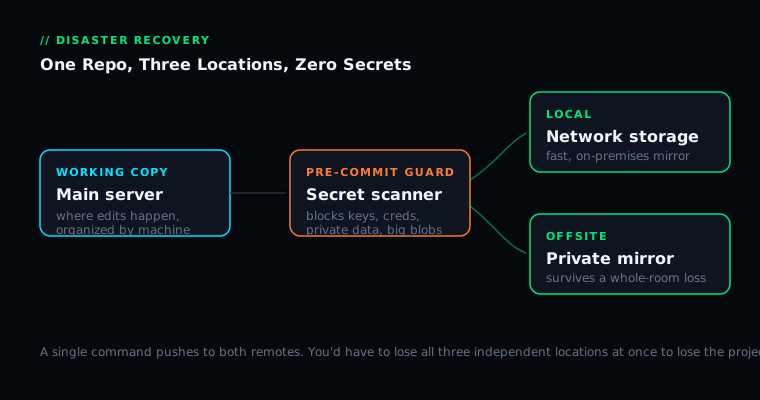
I went with a single repository — a monorepo — organized by physical machine. Each top-level folder is a host; under it, one folder per service, holding that service’s code and its startup configuration. Why machine-first? Because that’s how recovery actually happens. When a machine dies, you go to its folder and rebuild exactly what lived there. The structure mirrors the disaster.
Three documents do the heavy lifting: a restore runbook (step-by-step, per machine), a secrets manifest (every credential the system needs and where each one goes, with no actual values), and a service manifest (every background service and whether it starts automatically).
The Iron Rule: No Secrets, Ever
This was non-negotiable: not a single password, key, token, or piece of private data goes into the repository. Ever. A repository gets copied. It gets mirrored offsite. Once a secret lands in version-control history, it’s effectively permanent. The only safe secret is one that was never committed.
So the system uses placeholders — every service ships an example config with fake values, plus a note explaining what each real value is and where it comes from. To enforce this automatically, there’s a pre-commit guard that runs before every commit and blocks anything that looks like a credential, a private key, a database file, or an oversized binary.
Triple Redundancy
Code in one place isn’t a backup. So the repository lives in three: the working copy on the main server, a bare repository on network-attached storage (fast, local), and a private mirror offsite (so even a whole-room catastrophe can’t erase the project). A single command pushes to both remotes at once. You’d need to lose all three independent locations simultaneously to lose the project.
What the Inventory Actually Turned Up
Here’s where it got humbling. When I sat down to inventory every service running across every machine, I found substantially more than my notes had ever captured. Whole subsystems I’d built during some focused weekend months ago and mentally filed under “done” — without ever properly recording the details.
This is the exact gap that bites you at the worst possible moment: the distance between “what I think is documented” and “what’s actually running.” The inventory didn’t just back up the system. It revealed the system to me, accurately, for the first time.
The Guard That Earned Its Keep on Day One
The very first time I ran the full capture-and-commit process, the pre-commit guard blocked the commit — it had caught a live credential that had quietly slipped into a configuration file during the code pull. If I’d been relying on “I’ll just be careful,” that credential would have sailed straight into the repository and out to the offsite mirror. It happened again later, catching another sensitive file my manual exclusion rules had missed.
That’s the entire argument for defense in depth, demonstrated in real time: one safety check will eventually fail; that’s why you build more than one.
The Safe Backup Script
The final piece was a script to keep the repository current — to re-pull the latest code off every machine on demand. But a script that reaches into live machines is dangerous if you’re careless, so it was built with a strict safety contract: read-only on every machine (it only copies code out, never writes or restarts anything), never deletes (if a machine is unreachable, it skips and warns), stops before committing (it stages changes and hands them to me to review), and scans as it goes.
The Lessons
Notes are not a backup. If losing a disk means reconstructing software from descriptions, you don’t have disaster recovery — you have a writing assignment.
Inventory reveals reality. The act of cataloging everything will show you that your mental model of your own system is incomplete. Better to learn that during a calm afternoon than during a crisis.
Defense in depth is not paranoia. Every individual safeguard has a failure mode. The credential that nearly leaked was caught precisely because there were several checks, and they didn’t all fail at once.
Make recovery tooling boring and safe. The script that backs up your system should be the most cautious, least clever code you write.
Sleeping Better
There’s no cool demo for “my disaster recovery works.” But there’s real, tangible peace of mind in knowing that if any machine in the Batcave died tomorrow, I could rebuild it from a clone and a runbook in an afternoon — not reconstruct it from memory over a lost weekend. Build the boring foundation. It’s what lets you build everything else fearlessly.
— Colby, NerdlyBuilds