The Bot That Traded Nothing for Six Days: A Home-Lab Debugging Story
I built Jarvis a paper-trading bot that scans prediction markets and reasons about each one with a local AI. Then it quietly stopped trading for six days while looking completely healthy — and the fix had nothing to do with what I was asked to change. A small detective story about verifying the real problem.
 Colby Wright · Director of Engineering, AI Engineering & Automation
·6 min read·Updated
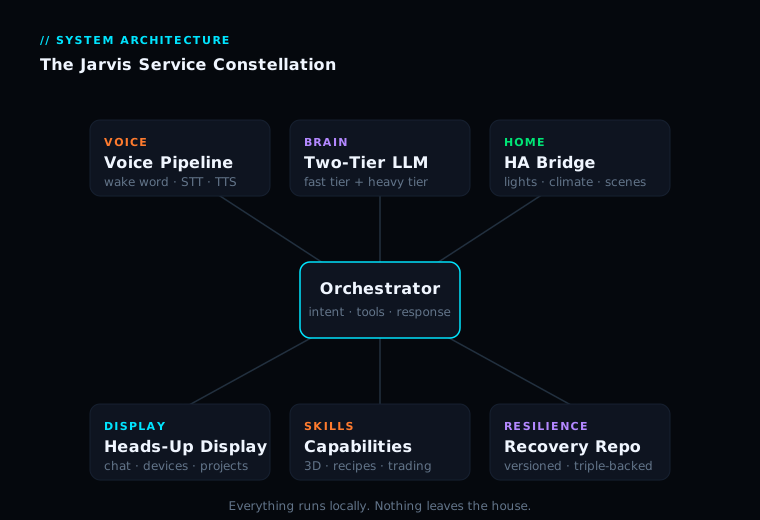
This is a deep-dive in my Jarvis build series — a locally-run AI command center for the home lab. Start with the flagship overview for the full picture.
One of the more experimental corners of the Jarvis project is a paper-trading bot — a service that scans prediction markets, reasons about each one using a local AI model, and logs simulated trades. No real money, ever. It’s a sandbox: a way to test whether an AI-driven strategy can actually find an edge, with zero financial risk.
It’s a fun build on its own. But the reason it’s worth a whole article is what happened when it broke — because the failure, and the fix, are a near-perfect lesson in how to debug a system that looks healthy but isn’t.
What the Bot Actually Does
The concept is straightforward. On a schedule, it pulls a batch of open prediction markets. For each one, it asks a local language model to reason about the likely outcome and decide whether there’s a worthwhile bet. When a market clears a confidence threshold, it logs a paper trade — a simulated position — and tracks it. When markets resolve, it scores the outcomes: wins, losses, running profit-and-loss.
It’s genuinely satisfying to watch. The strategy leans heavily on short-term weather markets, where strong priors make for high-confidence calls. It’s a clean little proving ground for “can a local AI find signal in a noisy market?”
The Symptom
The request that kicked off this whole episode was simple: “I want this running all the time. Hourly, if that makes sense.”
Reasonable ask. So I went to look at how often it was running — and immediately something didn’t add up. The newest logged trade was six days old. The profit-and-loss number hadn’t moved in nearly a week. For a bot that’s supposed to be scanning constantly, six days of total silence is a glaring red flag.
The easy interpretation — the one I was basically being asked to implement — was “it’s not running often enough; let’s schedule it to run hourly.” But that interpretation had a hole in it, and the hole is the whole point of this story.
Resisting the Obvious Fix
Here’s the trap: I was asked to make it run hourly. The easiest thing to do would be to set it to run hourly and call it done. It would feel like progress. It would technically be doing what was asked. But making a broken thing run more often doesn’t fix it — it just breaks more frequently. Before changing the schedule, I needed to answer a different question: why did it stop trading in the first place?
The Investigation
The first surprise: the bot wasn’t stopped. It had been running continuously the whole time — alive, healthy, consuming a little CPU, doing something every few minutes. By every surface-level health check, it looked fine. But it was producing zero trades. A loop that’s running but accomplishing nothing.
Digging into what each scan was actually doing revealed the truth: every single market evaluation was failing with the same error. The bot was asking a language model to reason about each market — and that request was bouncing back with “that model does not exist.”
The cause clicked into place. Earlier in the project, I’d reorganized the local AI setup — retired an older model configuration and replaced it with the current two-tier setup. But the trading bot’s connection to the AI was routed through a gateway whose configuration still pointed at the old, now-retired model. Every request went to a model that no longer existed, got a “not found” error, and silently failed.
The bot wasn’t broken. The plumbing between the bot and the brain was broken — pointing at a phone number that had been disconnected.
Why “Run It Hourly” Would Have Failed
This is the crux. If I’d just done what was literally asked — set the bot to run hourly — it would have changed nothing. It was already scanning every few minutes. The frequency was never the problem. It would have kept scanning, now on a different schedule, and kept failing every single time, just as silently.
The real problem was three layers away from the symptom. “Not trading” → “running but erroring” → “every AI call failing” → “gateway pointing at a retired model.” You only get there by refusing to stop at the first plausible explanation and actually following the trail.
The Actual Fix
The fix was almost anticlimactic compared to the investigation: repoint the gateway’s configuration from the retired model to the current one. A configuration change, not a code change. And then — once the bot could actually reach a working model — I made the scheduling change that was originally requested.
The proof was immediate: the very next scan went from “many markets checked, zero decisions, all errors” to “many markets checked, plenty of decisions logged, zero errors.” The bot started trading again on the first pass.
The Honest Scorecard
Since I had the data open, I took an honest look at how the strategy was doing. The settled trades showed a roughly 70% win rate — a genuinely good hit rate. But the running profit-and-loss was hovering right around break-even, very slightly negative. That combination tells a story: lots of small wins, occasionally given back by a larger loss. The hit rate is strong; the sizing of wins versus losses is what’s keeping it from being clearly profitable. Exactly the kind of insight a paper-trading sandbox exists to surface, with nothing real on the line.
There was also a pile of “pending” positions that looked alarming at first — until I saw they were long-dated macro markets that genuinely won’t resolve for months. Not stuck. Just patient. “Pending for a long time” and “broken” can look identical from a distance, and only inspection tells them apart.
The Lessons
Don’t fix the symptom you were handed — find the problem underneath it. The job isn’t to do what was literally asked; it’s to deliver what was actually wanted — a bot that trades.
A service can be running, healthy, and completely useless at the same time. Uptime is not the same as working. Always check that the thing is doing its job, not just that it’s breathing.
Configuration drift is silent and deadly. When you change a shared piece of infrastructure, the things that depended on it don’t announce that they’re now broken — you have to go check.
Verify before you diagnose. (Yes, again. It’s the recurring lesson of this entire project for a reason.) The obvious explanation was wrong, and only looking at the actual machine revealed the real cause.
The Payoff
The bot’s been trading happily ever since, logging fresh decisions on its schedule, completely unattended. But the real takeaway has nothing to do with prediction markets. It’s that the most valuable thing I did in this whole episode was not the fix — it was refusing to apply the easy, obvious, requested change before understanding why the system was actually broken. Thirty minutes of investigation saved a week of “why still isn’t it working.”
Note: this bot trades only simulated positions for experimentation. Nothing here is financial advice.
— Colby, NerdlyBuilds